Remove A Knock Sensor
Removing the knock detection is simple: Resolder R118 and R119 into R142, 143. Then, Remove R101 (optional).
Adapted from pgmfi.org wiki
Removing the knock detection is simple: Resolder R118 and R119 into R142, 143. Then, Remove R101 (optional). Finally, remove the knock board itself.
- no_knock.jpg:
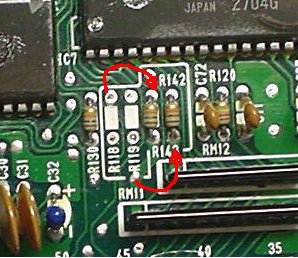
Here's what a knockless P14 looks like: CLick Here!Originaly posted by prelude-driverhere is how it works, R101 is a current limit to a signal on the KS, you need it with KS but you can leave it in because it does not go anywhere else. R118/119 are current limiters on the clock & data signals to the KS, if you remove the KS you must remove them because of the next resistors. R142/143 are pullup resistors for the clock & data lines, you dont use them if you have a KS because there are pullups on the KS itself, but if the KS is removed then you must fit these to stop the lines from floating. they are 10k btw.

| Attachment: | Modify: | Size: | Date: | Who: | Comment: |
|---|---|---|---|---|---|
 no\_knock.jpg no\_knock.jpg |
mod | 31356 | 26 Jan 2006 - 05:00 | synoptic |
Credits and source
Authors synoptic, carotman
Source Adapted from Remove A Knock Sensor on pgmfi.org wiki. Licensed under CC BY-NC-SA 1.0.