Jim Truett
#1 ◈ 2024-06-30
I have found a very good adapter to link the TTL output from an ECU to a Laptop or PC with a USB port. The Prolific PL-2303 works perfectly, and offers a high speed conversion that prevents reading lag. The throttle position, vehicle speed, and RPM gauge are very linear, with no jittering.
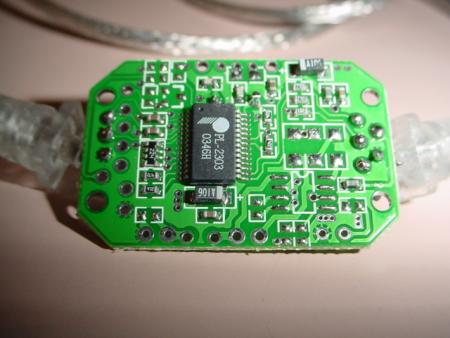
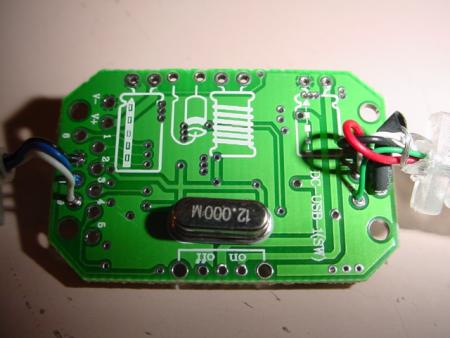
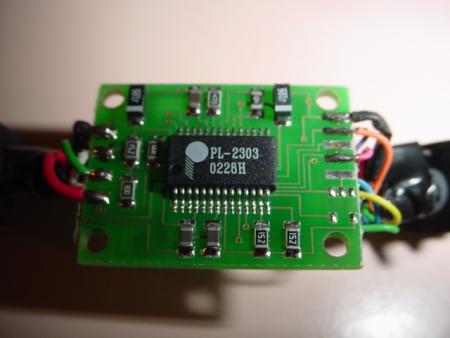
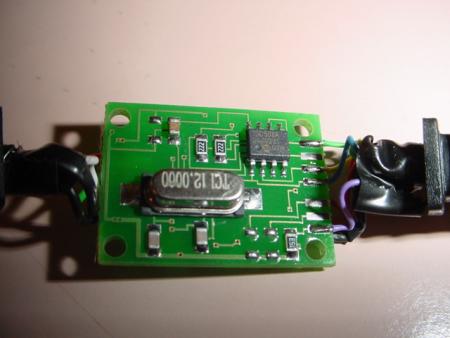
The proper cable for this mod is Radio Shack part number 170-0787, or similar cables available on eBay for Nokia models 3200 series, 5100 series, and 6100 series. The pictures I have linked to show two different adapters. The larger one in the clear housing is the unit I purchased off of eBay. The black housing is the Radio Shack #170-0787. Both cables operate the same way, but the RS cable is somewhat more complex.
/pgmfi/forum/media/17/171264ce09a30b334feadfb4738878acedb493d705a27ce18ca805495304ebb8.jpg
/pgmfi/forum/media/a3/a33f2511cc0a91db2633f0310a097876c6e0da427b54a3e9509b550160412ad9.jpg
/pgmfi/forum/media/de/deb389e31fec78ed7a91379a29f5cdcf52e3e45551c963bf8753dfc08e5cb31e.jpg
/pgmfi/forum/media/1e/1e45407a608c92d64987512f4ef1652f44e5fa7b048c12322035fc7748bf2cb0.jpg
The modification to the cables are similar.
With the Radio Shack cable, cut off the phone connector. Strip back the shielding to expose about 1" of wire.
Strip the brown wire and connect it to the shield conductor. Solder this to pin #1 on CN2.
Strip the orange wire and solder it to pin #2 on CN2. This is the RX lead on the cable.
Strip the red wire and solder it to pin #4 on CN2. This is the TX lead on the cable.
For the no-name eBay sourced cable, the hookup is very simple.
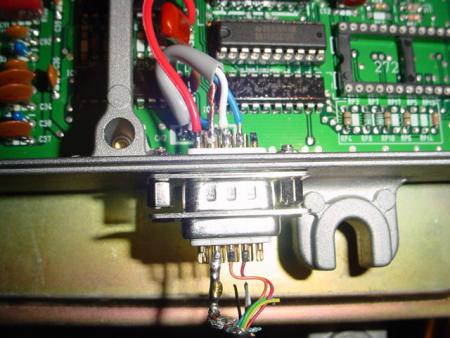
Strip the black wire and connect it to the shield conductor. Solder this to pin #1 on CN2.
Strip the white wire and solder it to pin #2 on CN2. This is the RX lead on the cable.
Strip the blue wire and solder it to pin #4 on CN2. This is the TX lead on the cable.
/pgmfi/forum/media/76/76eac5046d1bfe486d786083783eccc291182b7f7afcf37e04594c24733e6610.jpg
/pgmfi/forum/media/6e/6e6b45db4c7543f1f81a8aab9b9fb01feefbd5a72510a60f37fba91618d9bbda.jpg
I chose the DB9 connector to allow external connection to my ECU because of simplicity and availability. Disregard the red wire in the pictures. It is +5v power for another project.
Load the USB driver into your PC or laptop. If you purchased the Radio Shack cable, you will need to download the USB driver as directed. This is not the method I recommend, because Nokia phone information is included with it. If anyone needs the proper driver, let me know. It is a 4.2mb file, but I can email it if you have the room in your inbox.
Download the proper datalogging .bin from the ECUcontrol website. Modify it as necessary for your application, burn it to an EPROM and install it in your ECU.
On your PC or laptop, open the device manager, and check your port settings for your new USB cable. Note which com port it is using, and set up ECUcontrol to read that port. If necessary open the properties tab and change the com port number to reflect the port you want it to use, like com4 or com5. Plug in your USB cable before Starting your car so it will initialize properly. Click on "start datalogging" and enjoy.
[%sig%]
Post Edited (02-10-04 00:57)
The proper cable for this mod is Radio Shack part number 170-0787, or similar cables available on eBay for Nokia models 3200 series, 5100 series, and 6100 series. The pictures I have linked to show two different adapters. The larger one in the clear housing is the unit I purchased off of eBay. The black housing is the Radio Shack #170-0787. Both cables operate the same way, but the RS cable is somewhat more complex.
/pgmfi/forum/media/17/171264ce09a30b334feadfb4738878acedb493d705a27ce18ca805495304ebb8.jpg
/pgmfi/forum/media/a3/a33f2511cc0a91db2633f0310a097876c6e0da427b54a3e9509b550160412ad9.jpg
/pgmfi/forum/media/de/deb389e31fec78ed7a91379a29f5cdcf52e3e45551c963bf8753dfc08e5cb31e.jpg
/pgmfi/forum/media/1e/1e45407a608c92d64987512f4ef1652f44e5fa7b048c12322035fc7748bf2cb0.jpg
The modification to the cables are similar.
With the Radio Shack cable, cut off the phone connector. Strip back the shielding to expose about 1" of wire.
Strip the brown wire and connect it to the shield conductor. Solder this to pin #1 on CN2.
Strip the orange wire and solder it to pin #2 on CN2. This is the RX lead on the cable.
Strip the red wire and solder it to pin #4 on CN2. This is the TX lead on the cable.
For the no-name eBay sourced cable, the hookup is very simple.
Strip the black wire and connect it to the shield conductor. Solder this to pin #1 on CN2.
Strip the white wire and solder it to pin #2 on CN2. This is the RX lead on the cable.
Strip the blue wire and solder it to pin #4 on CN2. This is the TX lead on the cable.
/pgmfi/forum/media/76/76eac5046d1bfe486d786083783eccc291182b7f7afcf37e04594c24733e6610.jpg
/pgmfi/forum/media/6e/6e6b45db4c7543f1f81a8aab9b9fb01feefbd5a72510a60f37fba91618d9bbda.jpg
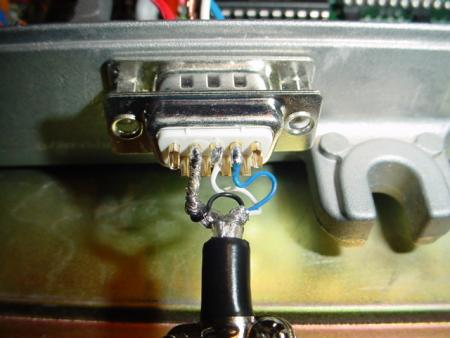
I chose the DB9 connector to allow external connection to my ECU because of simplicity and availability. Disregard the red wire in the pictures. It is +5v power for another project.
Load the USB driver into your PC or laptop. If you purchased the Radio Shack cable, you will need to download the USB driver as directed. This is not the method I recommend, because Nokia phone information is included with it. If anyone needs the proper driver, let me know. It is a 4.2mb file, but I can email it if you have the room in your inbox.
Download the proper datalogging .bin from the ECUcontrol website. Modify it as necessary for your application, burn it to an EPROM and install it in your ECU.
On your PC or laptop, open the device manager, and check your port settings for your new USB cable. Note which com port it is using, and set up ECUcontrol to read that port. If necessary open the properties tab and change the com port number to reflect the port you want it to use, like com4 or com5. Plug in your USB cable before Starting your car so it will initialize properly. Click on "start datalogging" and enjoy.
[%sig%]
Post Edited (02-10-04 00:57)