OBD1 J12 Jumper: Half-Duplex to Full-Duplex Conversion
OBD1 vehicles feature a factory diagnostic connector linked to the ECU serial port via a half-duplex connection; removing the J12 jumper enables full-duplex mode for improved data logging reliability.
Factory OBD1 Configuration
In its factory configuration, an OBD1 vehicle features a diagnostic connector located beneath the dashboard. This connector is wired to the ECU serial port and operates in half-duplex mode, meaning a single wire handles both reception and transmission. Only one deviceâeither the diagnostic tool or the ECUâcan transmit at any given time.
J12 Jumper Function
The J12 jumper, when installed, bridges the receive and transmit lines in half-duplex mode. Removing this jumper disconnects the receive line from the transmit line, enabling full-duplex operation. This allows both the diagnostic tool and ECU to transmit simultaneously over separate channels.
Important
Removing the J12 jumper disables the factory diagnostic connector under the dashboard.
Full-Duplex Benefits
Full-duplex mode provides significant advantages for data logging applications:
- Reliable data logging without signal collision or corruption
- Higher sampling rates for continuous monitoring without command interference
- Simultaneous bidirectional communication between ECU and external devices
Ongoing firmware development leverages full-duplex operation to achieve sampling rates previously unattainable in half-duplex mode.
JDM P30 ECU Variant
On JDM P30 ECUs (small square form factor), the equivalent jumper is designated J4 rather than J12.
Visual Reference
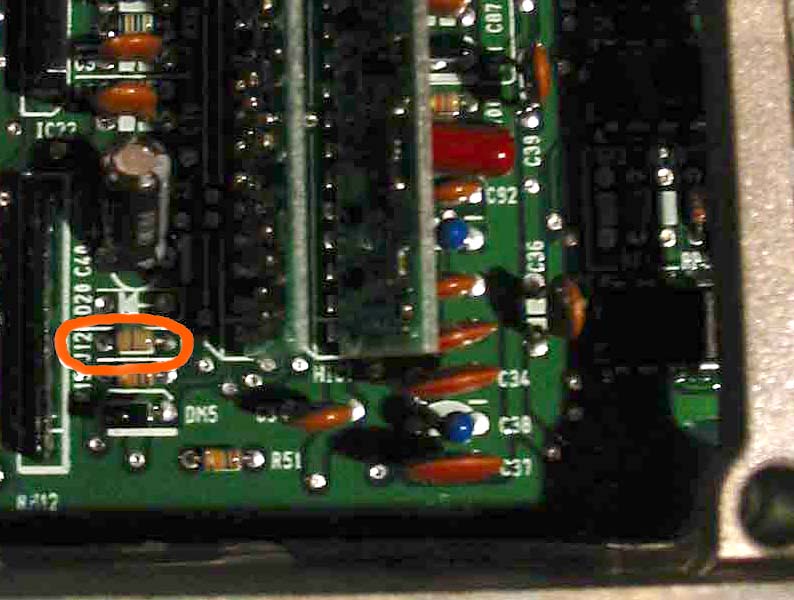 J12 jumper location on OBD1 ECU